



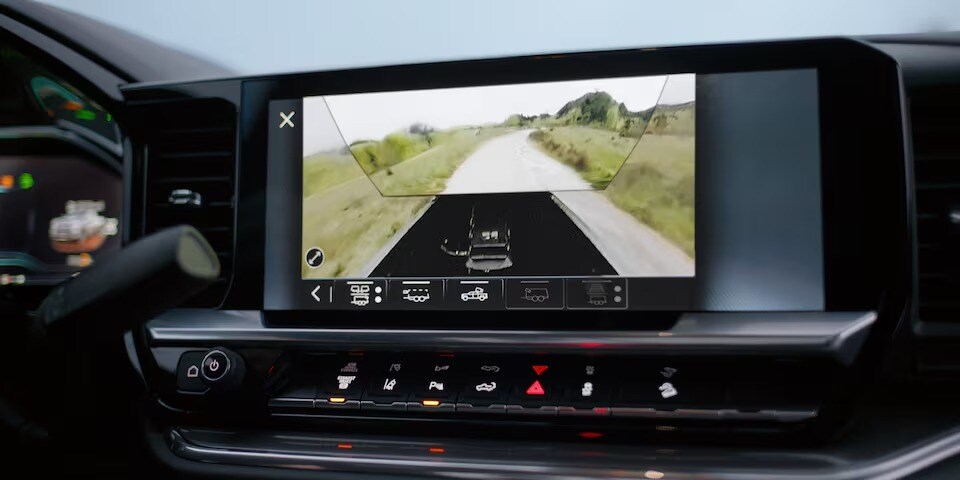
- Chevy off-road camera systems help drivers see trail obstacles that are hidden by the hood, frame, or tight terrain.
- Front, underbody, side, rear, and HD Surround Vision views each solve a different visibility challenge on Victorville-area trails.
- Clean lenses, practice, and knowing which camera view to use before each obstacle make the system far more useful off-road.
Most High Desert drivers know exactly what Victorville trails can throw at you. Rock shelves, sudden washouts, switchbacks so tight you're not sure where your front bumper ends. A basic backup camera handles parking lots just fine, but out here, a single rear-facing lens won't keep you out of trouble. If you're ready to explore what a capable camera system can do for your trail runs, browse our current Chevrolet inventory to see what we have in stock.
Chevrolet off-road cameras built into trucks like the Silverado address the terrain directly. These multi-angle systems give you live feeds from positions you'd never see from the driver's seat alone. The front, the sides, below the frame, and a full overhead view all work together so you can place your truck exactly where it needs to be.
Why Victorville Trails Call for More Than a Backup Camera
The terrain surrounding Victorville is genuinely demanding. Heading out toward Stoddard Valley OHV Recreation Area, Mojave Road, or the Johnson Valley area, you'll encounter rocky two-tracks, eroded channel crossings, and narrow shelf roads where a single wrong placement can wedge a wheel or worse. These aren't conditions that reward partial information.
A standard rear camera only shows you what's behind the vehicle when you're reversing. It tells you nothing about the boulder field your front axle is about to cross, the drop-off two feet to your left, or the jagged rock sitting directly under your transfer case. Off-road driving on High Desert trails demands full-scene awareness, and that requires a truck camera system designed specifically for terrain like this.
How Chevrolet Off-Road Cameras Work Together on the Trail
Chevy's off-road camera technology focuses on giving you specific, useful information at moments when you genuinely need it. Each camera feeds a particular view rather than piling on redundant angles. Views can be called up individually or combined, so you get the right perspective for each phase of a technical obstacle. When you're picking a line through a rocky section, the cameras work as a coordinated set rather than isolated tools.
Front Bumper Camera: Seeing Past the Hood on Steep Approaches
On steep approach angles, the hood of a full-size truck blocks a huge portion of what's directly in front of you. You're essentially committing to an obstacle before you can see it clearly. The front bumper camera solves this by mounting a lens at the lowest point of the front fascia, angled downward toward the ground.
When you're nosing into a rocky descent or crawling over a ledge approach near the High Desert foothills, this view shows you the exact surface your front tires are about to contact. You can see loose gravel, an embedded rock, the lip of a ledge, or a soft sandy patch before your weight shifts onto it. That advance information is what separates a clean line from a costly mistake.
Underbody Camera: A Live View of What Your Tires Are Rolling Over
The underbody camera is one of the more useful pieces of technology in the Chevrolet off-road camera lineup. It uses a forward-facing camera mounted beneath the vehicle to project a real-time view of the ground directly under the truck onto the infotainment screen.
When you're straddling a rocky ridge or threading through a boulder-heavy section of trail, you can watch the terrain pass beneath your frame. Rocks that would otherwise be invisible from the driver's seat show up clearly on screen, so you can shift your line while you're still moving. Anyone who has ever heard that crunching sound and wished they'd been six inches to the left will appreciate what this feed actually changes.
HD Surround Vision: Full-Scene Awareness When the Trail Gets Tight
The HD Surround Vision system stitches together inputs from multiple cameras positioned around the truck to generate a bird's-eye overhead view of the vehicle and its immediate surroundings. It helps you visualize your truck's position in relation to everything around it simultaneously.
HD Surround Vision shows clearances on all four sides at once. For tight passes on Victorville-area trails, where the margin between your mirrors and a canyon wall might be measured in inches, this combined view gives you real spatial reference rather than guesswork. The overhead view updates in real time, so as you ease forward, you see exactly how your truck is tracking relative to the terrain around it.
Matching Camera Views to Real High Desert Trail Challenges
Knowing the cameras exist is one thing. Knowing which view to pull up at each stage of a difficult section is what actually improves your off-road experience. Each part of a High Desert trail route presents a different visibility challenge, and the Chevrolet off-road camera system has a specific answer for each one.
Rocky Sections and Washouts: When the Underbody Feed Matters Most
Rocky technical sections and eroded washout crossings are where the underbody camera earns its place. When your tires are walking over broken rock or you're crossing a washout with uneven ledges on both sides, you want to see exactly what each tire is doing and what the frame is passing over.
The underbody feed shows rock placement under the vehicle in real time. You can watch your front tire roll over a rock before your rear tire gets there, which gives you a window to adjust speed or steering angle before it matters. Washout crossings with abrupt channel edges benefit especially from this view because you can track the drop-off as your front wheels clear it before committing the rear axle.
Narrow Desert Passes and Switchbacks: Using Side and Front Views Together
Narrow passages in the High Desert, particularly on shelf roads and tight switchbacks near elevated terrain, benefit from combining the side camera feed with the front bumper angle. Using these two views together gives you a complete picture of how close you are to the edge while still monitoring what's ahead.
On a switchback, the front bumper camera lets you see the turn's outside edge while you steer around it, and the side views confirm how close your rear wheels are to the inside cutbank. Pairing these views takes a little practice, but tight trail turns that would otherwise require a spotter become far more manageable once you're comfortable reading both feeds together.
Reversing Uphill: How the Rear Camera and Surround Vision Work as a Pair
Backing up any slope adds complexity, and uphill reversals on trail are among the trickier maneuvers to execute cleanly. The rear camera shows you what's directly behind the truck, but HD Surround Vision adds the overhead perspective so you can see both rear clearance and lateral positioning simultaneously.
On a narrow uphill track, the rear camera handles the line while HD Surround Vision keeps you aware of your truck's position within the trail corridor. The two views complement each other rather than competing, which takes real pressure off the driver during an already demanding maneuver. If you want to see these views in action before heading out, view available Chevy trucks and SUVs and come in for a walk-through with our team.
How to Switch Views Without Losing Focus on the Trail
The practical challenge with any multi-view camera system is that switching between feeds mid-obstacle has to happen quickly and without pulling your attention from the terrain. Chevrolet's infotainment interface addresses this with straightforward controls that let you call up different camera angles directly from the screen without digging through multiple menus.
Before starting a technical section, decide in advance which views you'll use and in what order. Thinking through a rocky ledge crossing before you reach it means you can move from the front camera view to the underbody feed to HD Surround Vision in a purposeful sequence rather than hunting for the right button in the moment. The interface responds quickly, so transitions stay smooth when you need them most.
Smart Habits That Make Chevrolet Off-Road Cameras More Useful
Getting the most out of these systems comes down to habits that make the technology second nature rather than a distraction.
- Spend time with the system before hitting a technical trail. Parking lot practice with the overhead view and underbody feed helps you understand how the on-screen image corresponds to real-world positioning.
- Keep your camera lenses clean. The High Desert coats everything in dust and mud, and a dirty underbody lens tells you nothing useful. A quick wipe-down before and after a run keeps the feeds sharp.
- Know the system's coverage limits. No camera system eliminates blind spots entirely, so pairing the technology with situational awareness and occasional spotter use on truly technical lines remains the right approach.
- After a hard trail run, have the camera systems and sensors checked by a qualified technician. Our service center can help ensure everything is properly calibrated after time on demanding terrain. Schedule a service visit before your next run if you've been pushing the truck hard.
Which Chevy Trucks Come with Off-Road Camera Features
Chevrolet offers meaningful off-road camera capability across several trucks in the current lineup. The Silverado brings front and rear camera functionality along with HD Surround Vision on applicable configurations, with off-road camera features varying by trim and package. The Colorado also offers off-road camera features, including underbody views both front and rear, and its smaller footprint makes it a solid choice for High Desert trail use where tight passages are part of the route.
Feature access depends on the specific truck, trim level, and option package selected, so availability varies. If you're shopping specifically for off-road camera features, trim and package selection matter quite a bit. Our team can walk you through exactly which configurations include the camera technology you're looking for.
Take a Camera-Equipped Chevy for a Test Drive
Reading about how these systems work is useful, but the real learning happens once you're sitting in the driver's seat watching the underbody feed in motion or pulling up HD Surround Vision while threading through a tight space. The technology makes much more sense once you've experienced it directly.
We're located at 15425 Dos Palmas Road in Victorville, California, and we keep a strong selection of Silverado and Colorado trucks in stock, including trims equipped with off-road camera features. Reach out to our team to ask about current inventory, schedule a test drive, or request a camera walk-through before your visit. If the trails around Victorville are part of your routine, a camera-equipped Chevy truck gives you better information at the moments when it actually counts.
Frequently Asked Questions
Why are off-road cameras useful on Victorville trails?
Off-road cameras help drivers see rocks, washouts, trail edges, and underbody obstacles that are difficult or impossible to see from the driver's seat alone.
What does the underbody camera show?
The underbody camera projects a real-time view of the ground beneath the truck, helping drivers track rocks, ridges, ledges, and tire placement while moving through technical terrain.
How does HD Surround Vision help off-road?
HD Surround Vision combines multiple camera feeds into an overhead-style view so drivers can see clearance around the truck during tight passes, switchbacks, and careful trail maneuvers.
Which Chevy trucks offer off-road camera features?
Off-road camera features are available on select Chevrolet truck configurations, including Silverado and Colorado models, depending on trim level and option package.
Categories:
Technology