



Silverado owners will tell you different things about their infotainment screens, and it usually comes down to model year. Newer Chevys ship with Chevrolet Google Built-In, which changes how you navigate, listen to music, and talk to your truck. If you're shopping the High Desert market and keep seeing this term on window stickers, it affects daily driving around Victorville and Apple Valley in some pretty practical ways. Browse our new Chevrolet inventory or check out our Chevy EV lineup to see which models include it.
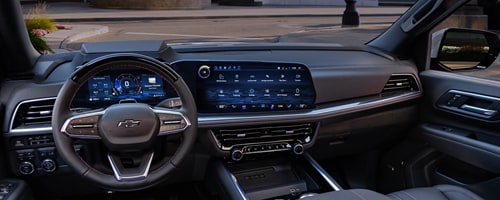
What Is Chevrolet Google Built-In?
Chevrolet Google Built-In is an infotainment operating system that puts Google Maps, Google Assistant, and Google Play directly into the vehicle's software. Unlike apps mirrored from a phone, this software runs on the truck or SUV itself. Core functions work whether you carry an iPhone or Android device, and in many cases the system operates without a phone present at all.
The Google-Chevrolet Technology Partnership
Google and General Motors jointly built this system, delivering it to compatible vehicles starting in late 2022 through a vehicle software update, not something our Victorville Chevrolet team codes or customizes. The partnership spans every GM brand, so the same Google-integrated apps and voice tools appear in Chevrolet, Buick, Cadillac, and GMC models.
How Google Built-In Differs From Apple CarPlay and Android Auto
The biggest difference is where the software lives. Android Auto and Apple CarPlay project your phone's screen onto the dashboard, mirroring what's already on your device. Google Built-In skips that step and runs as the vehicle's own operating system, so it keeps working as long as the truck has an active data plan, phone or no phone.
That distinction matters in practice. During an active Android Auto session, voice commands default to your phone's assistant, and embedded vehicle commands like climate control aren't available until you switch away from that screen. With Google Built-In, there's no switching. Maps, voice, and vehicle controls all live on one system.
| Feature | Google Built-In | Android Auto | Apple CarPlay |
|---|---|---|---|
| Native Integration | Yes, runs on vehicle OS | No, mirrors phone | No, mirrors phone |
| Voice Assistant | Google Assistant/Gemini | Phone's assistant | Siri |
| Maps/Navigation | Google Maps, native | Google Maps, mirrored | Apple Maps or mirrored apps |
| App Store Access | Google Play, in-vehicle | Limited to supported apps | Limited to supported apps |
| Phone Requirement | Not required for core use | Required, connected | Required, connected |
| Offline Functionality | Core features work without phone | Requires phone present | Requires phone present |
Navigating With Google Maps in Your Chevrolet
Google Maps comes preloaded at no extra subscription cost, though it needs a connected data plan to pull live information. You get turn-by-turn directions, current ETAs, and nearby points of interest without touching your phone.
Vehicles with Google Maps built in tend to hold a connection better than phone-based navigation, largely because the vehicle's antenna is bigger and more powerful than a smartphone's. That often means a stronger signal where phone reception drops out.
Real-Time Traffic and EV Charging Routing
Live traffic monitoring flags delays and accidents so the system can suggest alternate routes automatically. For EV owners, this same navigation system handles charging logistics too: it plans charging stops on its own, displays Ultium Charge 360 charging stations along your route, estimates remaining battery at arrival, and preconditions the battery pack for faster DC fast charging on models like the Silverado EV and Blazer EV.
Some stretches of the High Desert don't have much charging infrastructure yet, so planning stops ahead of time saves you a headache on longer EV trips. A voice command like "Hey Google, add a charging station to my route" handles it on the fly.
Downloadable Apps and Entertainment via Google Play
Google Play turns your dashboard into its own app store. Rather than relying on your phone, you can download compatible automotive apps straight to the vehicle. Spotify and YouTube Music cover streaming audio, Audible handles audiobooks, and various podcast apps round things out. These apps run independently once installed, so a dead phone battery doesn't mean a silent cabin on a long Cajon Pass drive.
Hands-Free Voice Controls and Vehicle Commands
Google Assistant is built into the system and can't be fully deactivated, though you can turn off the "Hey Google" wake phrase under Settings > Assistant & Voice if you'd rather use the push-to-talk button. Activate it by tapping the Assistant icon, pressing the steering wheel button, tapping the mic icon in Maps, or just saying "Hey Google."
Once activated, it handles quite a bit:
-
"Turn up the volume" or "set the temperature to 70 degrees"
-
"Navigate home" or "where's my next turn"
-
"Play Today's Top Hits playlist on Spotify"
-
"Send a text to Mom that I'm on my way home"
-
"What's the weather forecast for tomorrow?"
Voice controls calls, texts, music, and climate, keeping your hands on the wheel through Cajon Pass traffic or a long haul out to Vegas.
Introducing Google Gemini in Your Chevrolet
Gemini replaces Google Assistant as GM's default voice AI on eligible vehicles equipped with Google Built-In. Where the old Assistant relied on set commands, Gemini brings genuine conversational ability, understanding context and follow-up questions instead of requiring memorized phrasing.
GM's global VP of product management, Tim Twerdahl, said, "Gemini delivers AI assistance to millions of drivers across every segment and price point for a wide range of everyday needs." GM estimates roughly 4 million eligible U.S. vehicles will gain access to Gemini.
Gemini Rollout Timeline for 2022 and Newer Models
As of this writing, the rollout began April 30, 2026, and is expected to phase in over several months across eligible model-year 2022 and newer vehicles. It's U.S.-only for now, and the assistant language needs to be set to U.S. English. Owners will see an on-screen notification when Gemini is ready and can opt out at any time. Eligible vehicles generally span model years 2022 through 2027 with compatible infotainment, while all 2025-and-newer vehicles with Google Built-In come with Gemini support from the factory.
What Gemini Adds Beyond Google Assistant
Where the older Assistant needed specific phrasing, Gemini holds a real back-and-forth conversation. It can help with navigation questions, summarize or draft text replies, suggest destinations, build playlists, adjust climate and vehicle settings, and even help brainstorm ideas out loud.
Google Account, Data, and Software Update Requirements
You don't need a Google account to use core features, but signing in unlocks personalization like saved locations and music preferences. Sign in through your profile name and "Manage Profile," or when you first open Maps or Play. A separate GM account gets prompted at first use and enables roadside assistance requests and service scheduling. Neither requires a paid subscription just to function, though a connected data plan through OnStar is necessary for live features like traffic and Gemini.
Gemini specifically needs an active OnStar connection, a Google account signed into Play Store, your opt-in consent, and an infotainment system running Android 11 or newer. Some older systems won't qualify.
Every update, routine or feature-level, happens over the air (OTA). The vehicle stays usable while updates download in the background, and you'll get a prompt to install once parked. Installation can take up to about 20 minutes and can't be interrupted once started, so avoid underground or covered parking during that window.
Common sign-in and connectivity issues:
-
Assistant not responding: confirm "Hey Google" is enabled under Settings > Assistant & Voice.
-
Maps or Play won't load: check your OnStar data connection and signal.
-
Gemini not appearing: verify your infotainment runs Android 11 or newer and that you've opted in.
-
Personalization missing: make sure you're signed into the correct driver profile.
If you're unsure whether your specific trim supports these features, our team can confirm it. Reach out here before you finalize a purchase.
Google Built-In Availability Across Chevrolet Models
Google Built-In now spans a large portion of the Chevrolet lineup, including the Trax, Trailblazer, Equinox, Traverse, Tahoe, Suburban, Colorado, Silverado, Camaro, Corvette Stingray, and the EV lineup covering the Blazer EV, Bolt EV, and Bolt EUV.
Silverado, Colorado, and Beyond
The 2026 Silverado 1500 pairs a 13.4-inch center touchscreen with a 12.3-inch Driver Information Center on most trims. The 2026 Silverado 2500HD offers that same 13.4-inch touchscreen with Google Built-In on LTZ trims and above, alongside wireless Apple CarPlay and Android Auto support and a 12.3-inch digital cluster. The Colorado brings an 11-inch digital gauge cluster paired with an 11.3-inch infotainment screen supporting Apple CarPlay and Android Auto alongside Google Built-In. Looking ahead, the 2027 Silverado is set to offer more than 60 inches of combined digital display (as much as roughly 63.5 inches when fully equipped), with a 16.3-inch touchscreen housing Google Built-In standard across every trim.
To confirm a specific trim has it, check for the Google Play icon on the infotainment screen, look at the window sticker, or ask our sales team directly.
Why Victorville Drivers Benefit From Google Built-In
High Desert driving has its own demands. Whether you're commuting through Cajon Pass, running errands around Bear Valley Road, or heading out toward Barstow or Lancaster, a stronger onboard connection matters. Because the vehicle's antenna outperforms a typical phone antenna, drivers often keep a usable connection through stretches where cell service usually fades.
For families sharing one vehicle, Google Built-In also recognizes different drivers and loads each person's individual Maps history, contacts, and music preferences once they sign in. That's handy for households running errands between Victorville, Hesperia, and Adelanto with more than one driver behind the wheel. EV shoppers get added confidence too, since charging-stop routing and battery preconditioning ease range anxiety in the High Desert's more spread-out charging network.
Experience Google Built-In at Victorville Chevrolet
Reading about a feature only gets you so far. The best way to understand how Chevrolet Google Built-In feels behind the wheel is to sit in one and try it yourself.
Visit Our Dealership
At Victorville Chevrolet, located at 15425 Dos Palmas Road, Victorville, CA 92392, our team can walk you through Maps, voice controls, and Gemini on the Silverado and Colorado trims we keep well-stocked, along with the rest of our new and pre-owned lineup. We serve drivers throughout San Bernardino County, including Apple Valley, Fontana, Hesperia, Palmdale, and Rialto.
Ready to See It in Person?
Contact us or stop by, and we'll get you behind the wheel.
Photo Courtesy of Chevrolet