



 â
â
- Hill Descent Control uses the vehicle’s antilock braking system to maintain a controlled low speed while descending a steep grade.
- The system is most useful on loose, rocky, sandy, or uneven descents where repeated manual braking could cause individual wheels to lose traction.
- Hill Descent Control does not steer the vehicle, choose a safe path, or create traction where the tires cannot grip.
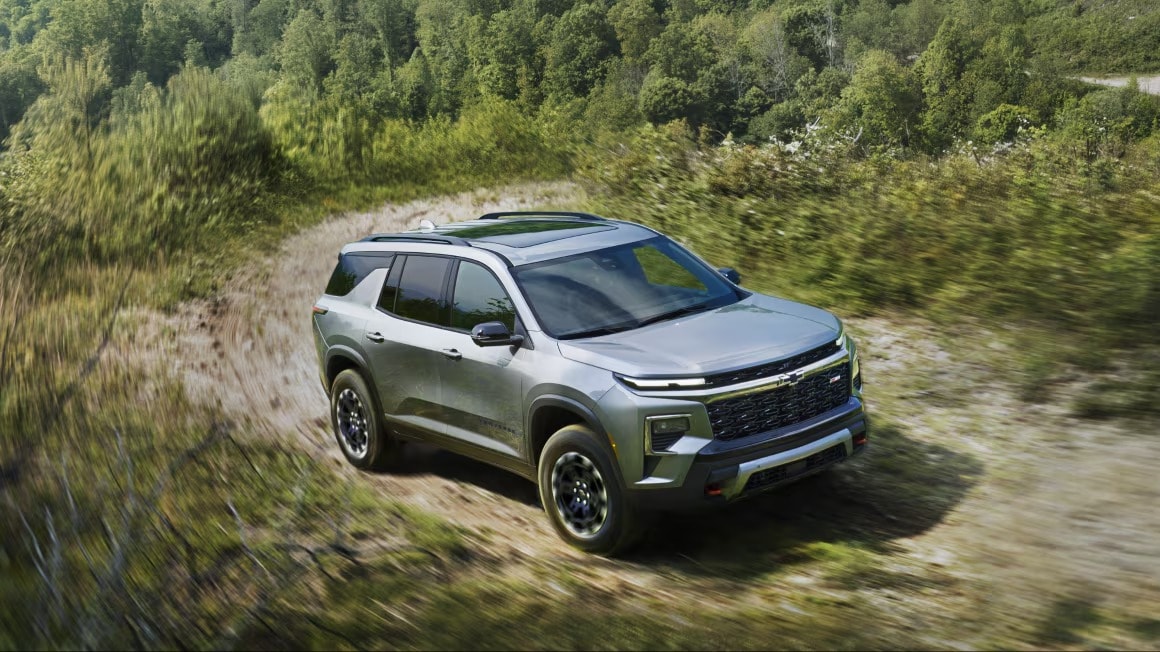
Hill Descent Control is an available Chevrolet feature designed to make steep, low-speed descents easier to manage. When activated under the correct conditions, the system applies the brakes at individual wheels to help maintain a set speed. This lets the driver concentrate on steering, tire placement, and the terrain ahead instead of repeatedly pressing and releasing the brake pedal.
That can be particularly useful around Victorville, where drivers may encounter loose gravel, sandy washes, rocky drops, and changing trail surfaces near Stoddard Valley, El Mirage, or designated routes in the San Bernardino National Forest. Hill Descent Control can add confidence in those situations, but it still requires careful vehicle placement and responsible use.
What Is Chevrolet Hill Descent Control?
Chevrolet Hill Descent Control, commonly abbreviated as HDC, is a low-speed driver-assistance system for descending steep grades. It works with the vehicle’s antilock braking system, wheel-speed sensors, traction controls, and stability systems to manage downhill speed.
Instead of applying the same braking force at all four wheels, the system can make individual adjustments based on wheel speed and available traction. If one tire begins moving faster than the others on loose rock or gravel, HDC can respond at that wheel. This can provide steadier progress than holding the brake pedal at one fixed position throughout the descent.
When the system is available and ready, the Hill Descent Control indicator generally remains illuminated. When the light flashes, the system is actively applying the brakes to control vehicle speed. Indicator behavior can vary slightly by model year, so the owner’s manual should always be the final reference.
How Does Hill Descent Control Work?
Hill Descent Control functions somewhat like very low-speed cruise control, but it manages braking rather than maintaining highway speed. The driver activates the system before or at the beginning of a steep descent. The vehicle then works to maintain a controlled speed while traveling forward or, on certain models, in reverse.
Chevrolet HDC operating ranges vary by vehicle. Some Chevrolet trucks can maintain speeds between approximately 1 and 14 mph, while other models may allow a somewhat higher maximum setting. The system must usually be enabled below a separate activation-speed threshold.
Depending on the Chevrolet model, the driver may adjust the target speed using:
- The accelerator pedal
- The brake pedal
- Cruise-control switches
- Driver Mode Control settings
Once the accelerator or brake is released, the system may maintain the newly selected low speed. Exact controls and operating limits depend on the model, equipment, and year.
How to Use Hill Descent Control in a Chevrolet
The process is generally straightforward, but drivers should review their Chevrolet owner’s manual before reaching the trail. Some vehicles require a particular transfer-case or drive-mode setting before HDC becomes available.
- Slow the vehicle before reaching the steep section.
- Select the appropriate four-wheel-drive setting or Terrain Mode when required.
- Press the Hill Descent Control button.
- Confirm that the HDC indicator appears in the instrument cluster.
- Ease the vehicle onto the descent while keeping both hands on the steering wheel.
- Use the approved controls for your model to adjust the target speed.
- Maintain a direct, controlled path down the grade.
You may hear mechanical noises or feel pulsing through the vehicle while Hill Descent Control is operating. This can be normal because the antilock braking system is making rapid individual brake adjustments. Stop and inspect the vehicle if you notice a warning message, strong pulling, unusual grinding, or behavior that differs from normal HDC operation.
When Is Hill Descent Control Most Useful?
Hill Descent Control is intended for steep descents at low speeds. It is most valuable when the surface has inconsistent traction and the driver needs precise control rather than momentum.
Common situations include:
- Rocky descents with uneven wheel placement
- Loose gravel that can shift beneath the tires
- Sandy or dusty grades with limited braking traction
- Rutted trails where one or more wheels may unload
- Muddy surfaces after seasonal rain
- Slow reverse movement down an incline when supported by the vehicle
Drivers using open OHV areas near the High Desert should confirm current operating conditions before leaving. El Mirage OHV Recreation Area, for example, is managed by the Bureau of Land Management and may be affected by lakebed closures or changing conditions. The San Bernardino National Forest permits full-size four-wheel-drive vehicles on designated roads, but cross-country hill climbing is not permitted. Stay on routes that are open to your vehicle type and follow all posted restrictions.
Hill Descent Control Is Not for Cajon Pass Highway Driving
Hill Descent Control is not designed to manage ordinary highway-speed travel down Cajon Pass. Its purpose is controlled low-speed operation on steep trails or similar terrain.
For extended paved grades, your Chevrolet may use other systems such as transmission grade braking, Tow/Haul Mode, or cruise-control grade braking. These features manage transmission shifts and engine braking at road speeds. Drivers towing through Cajon Pass should also follow the trailering instructions and weight limits for their specific vehicle.
If you are unsure which system should be used, consult the owner’s manual rather than activating HDC at highway speed. The vehicle may reject the request and display a message if the speed is too high.
Hill Descent Control vs. Other Chevrolet Driving Systems
| System | Primary Function | Best Use |
|---|---|---|
| Hill Descent Control | Applies individual brakes to maintain a controlled low speed downhill. | Steep, loose, rocky, sandy, or uneven descents. |
| 4 Low | Uses lower transfer-case gearing to multiply torque and reduce vehicle speed. | Rock crawling, deep sand, steep climbs, and technical low-speed terrain. |
| Grade Braking | Uses transmission downshifts and engine braking to help control speed. | Long paved descents and normal road driving. |
| Tow/Haul Mode | Adjusts transmission shift behavior for heavy loads and trailers. | Towing or hauling on highways and mountain roads. |
| Hill Start Assist | Briefly holds brake pressure when starting on an incline. | Preventing rollback when moving from a stop on a hill. |
These systems may work together, but they are not interchangeable. A properly equipped Chevrolet may combine 4 Low with Hill Descent Control for a technical descent. The low-range gearing reduces speed mechanically, while HDC makes individual braking adjustments.
Our guide to Chevrolet 4x4 systems for High Desert terrain explains when to consider Auto 4WD, 4 High, 4 Low, Terrain Mode, and other traction features.
Does Hill Descent Control Replace 4 Low?
No. Hill Descent Control and 4 Low perform different jobs. HDC controls braking at individual wheels, while 4 Low changes the transfer-case gearing to increase low-speed torque and engine braking.
On a steep rocky grade, the two systems may complement each other. Four-wheel-drive low range can slow the vehicle through gearing, while Hill Descent Control manages wheel speed when traction changes. However, not every Chevrolet with HDC has a two-speed transfer case, and operating requirements differ across the lineup.
Never shift into 4 Low while traveling at normal road speed. Follow the procedure in the owner’s manual, which may require the vehicle to be stopped or moving very slowly with the transmission in Neutral.
Which Chevrolet Models Offer Hill Descent Control?
Hill Descent Control is available on several Chevrolet trucks and SUVs, particularly configurations intended for rough roads and off-pavement travel. Availability varies by model year, trim, package, drivetrain, and equipment.
Models that may include HDC include:
- Chevrolet Colorado Trail Boss, Z71, and ZR2 configurations
- Chevrolet Silverado 1500 models with select Z71 or Trail Boss equipment
- Chevrolet Tahoe and Suburban Z71 configurations
- Chevrolet Traverse Z71
The Chevrolet Colorado inventory in Victorville is a good starting point for drivers who want a manageable midsize truck with available off-road technology. Those needing additional passenger space can compare current Chevrolet Tahoe models, while drivers who want full-size truck capability can review the Chevrolet Silverado 1500 inventory.
Check the vehicle’s build information or ask our team to confirm whether a specific truck or SUV includes Hill Descent Control. A Z71 badge or four-wheel-drive system does not guarantee that every model year and configuration has identical controls.
What Hill Descent Control Cannot Do
Hill Descent Control supports the driver, but it does not make every slope safe. It cannot evaluate the trail ahead, determine whether the grade is passable, or prevent damage from rocks, washouts, and hidden obstacles.
HDC also cannot:
- Steer around rocks or ruts
- Create tire grip on a surface with no traction
- Increase ground clearance
- Prevent underbody contact
- Compensate for overloaded cargo or an improperly balanced trailer
- Replace proper tires and functional brakes
- Determine whether a route is legally open
Walk an unfamiliar descent before driving it when conditions allow. Look for sharp drop-offs, large rocks, deep ruts, limited turning room, and a safe exit at the bottom. If you cannot see the complete route or are uncertain about vehicle clearance, choose another path.
How to Drive a Steep Trail More Safely
Approach a descent slowly and as straight as the trail allows. Turning across a steep slope can increase rollover risk, particularly in a taller truck or SUV. Avoid sudden steering, acceleration, or braking inputs that could upset the vehicle’s balance.
Keep enough distance from the vehicle ahead so you can stop without entering the same obstacle. If you are traveling with a group, use a spotter on technical sections. The spotter should remain visible to the driver, stand away from the vehicle’s path, and use agreed-upon hand signals.
If HDC cannot maintain the selected speed or the vehicle begins sliding, do not assume the system will recover automatically. Apply appropriate braking, stop when safe, and reassess the route and surface conditions.
Check Tires and Brakes Before Heading Off-Road
Hill Descent Control depends on the braking system and tire traction. Worn tires, incorrect inflation, damaged brake components, or active ABS warnings may reduce its ability to help.
Before heading toward a High Desert trail, check:
- Tire pressure using the correct specification for the vehicle and load
- Tread depth and signs of uneven wear
- Sidewalls for cuts, cracking, or bulges
- Brake pedal feel and visible fluid leaks
- ABS, traction-control, and stability-control warning lights
- The spare tire and required tire-changing tools
- Recovery points and properly rated recovery equipment
Victorville Chevrolet provides Chevrolet brake service and helps local drivers select replacement tires for their Chevrolet. A service inspection can also identify wheel-speed sensor or ABS concerns that may affect Hill Descent Control operation.
Test the System Before You Need It
Do not wait until you are facing a steep drop to locate the HDC button or interpret the instrument-cluster light. Review the controls on level ground and read the Hill Descent Control section in the owner’s manual.
If possible, practice on a mild, open incline before attempting technical terrain. Learn how the vehicle sounds and feels when the system applies the brakes. Understanding normal operation makes it easier to recognize a warning or malfunction later.
Get Help With Chevrolet Off-Road Features in Victorville
Hill Descent Control can make low-speed trail descents more manageable by controlling braking at individual wheels. It works best when the driver understands its limitations, selects an appropriate route, and begins with properly maintained tires, brakes, and four-wheel-drive components.
Victorville Chevrolet helps drivers from Victorville, Apple Valley, Hesperia, Adelanto, and across the High Desert compare Chevrolet off-road features and keep those systems working properly. Visit our Chevrolet Service Center in Victorville for maintenance or contact our team to compare trucks and SUVs equipped for local trails.
Frequently Asked Questions
What does Chevrolet Hill Descent Control do?
Chevrolet Hill Descent Control uses the antilock braking system to apply braking at individual wheels and maintain a controlled low speed while the vehicle descends a steep grade.
Do I need to press the brake while using Hill Descent Control?
The system can maintain a selected low speed without constant brake-pedal input. The driver can still use the brake or accelerator when needed, but the exact method for adjusting speed varies by Chevrolet model.
Can I use Hill Descent Control on Cajon Pass?
Hill Descent Control is intended for low-speed steep descents, not normal highway travel through Cajon Pass. Grade braking, Tow/Haul Mode, and lower transmission ranges are more relevant for paved highway grades, depending on the vehicle and load.
Can Hill Descent Control be used without four-wheel drive?
Requirements vary by Chevrolet model. Some vehicles may allow Hill Descent Control in more than one drivetrain setting, while others require a particular four-wheel-drive mode. Check the owner’s manual for the specific vehicle before use.
Categories:
Technology